I’ve written previously about why I think an HSA is not only great in general, but is especially great if you have the ability to use it as a stealth retirement account. But for folks who want to use it this way, the HSA provider that they are with is not always the optimal choice. Typically your employer, in conjunction with the medical insurance provider they choose for the HSA-qualified High Deductible Health Plan, decide who the provider will be for your HSA account. Unfortunately, many of these providers are not as good as they could be.
For example, Optum Bank and HSA Bank are two of the common HSA providers that employers go with. While they are both “fine”, they also both have drawbacks if you want to use them as an investment vehicle. These drawbacks include a “threshold” amount that has to be kept in cash (can’t be invested and is often earning a very low interest rate, so even if you invest the rest a lot of “cash drag”), administrative fees to invest, and subpar investment choices. Let’s take a look (note that in some cases your employer may cover some of the fees or may have negotiated better fees).
- Threshold: $2,000 (they don’t publicly post their interest rates, so let’s assume close to 0%)
- Administrative Fees to Invest: $3.75/month if balance in cash account is less than $5,000; 0.03% AUM per month (capped at $10/month)
- Investments: Definitely some good choices, but also some high-fee, actively managed fund choices.
- Outbound Transfer Fee: Unclear. Some places say it’s $20, others say it’s $2.75. This is important to verify.
- Threshold: $1,000 (Interest rates are very low, starting at 0.05%)
- Administrative Fees to Invest: Varies, could be as much as 0.30% AUM.
- Investments: Definitely some good choices, but also some high-fee, actively managed fund choices.
- Outbound Transfer Fee: Free, but this is important to verify.
You can find information about other HSA providers here.
Because of those threshold amounts, low interest rates, and sometimes poor investments choices with additional fees, you would much rather your employer had picked an HSA provider like Fidelity.
- Threshold: $0 (Interest rates vary as money market rates do, but are currently around 5%)
- Administrative Fees to Invest: $0
- Investments: The whole universe of Fidelity investments, which means you can make bad choices, but also some very good ones.
- Outbound Transfer Fee: Free.
So at this point you might be wondering why you wouldn’t just open an HSA at Fidelity and contribute directly and just ignore the HSA provided by your employer. Well, you can. You can always contribute directly to your HSA, whether it is through your employer or not, as long as you stay within the yearly contribution limits. But there are two reasons you might not want to.
- If your employer contributes to your HSA for you, it will go into the employer-provided HSA account.
- Money that you contribute from your paycheck (as opposed to contributing directly), comes out pre-FICA (Social Security and Medicare). That means an additional 7.65% tax break for folks who contribute to Social Security, and still a 1.45% tax break for folks who don’t (like Colorado PERA members). That extra break is often worth having as much HSA contributions as possible come out of your paycheck as opposed to directly contributing. (Although it’s still good to “top off” your HSA account at the end of the year if you haven’t maxed it out yet.)
So, if you have money in your employer-based HSA but you don’t love some of the features, what can you do? Well, because money in an HSA is yours, you are allowed to move it to another HSA provider. But keep in mind the possible outgoing transfer fee. For example, if you have an HSA provider like HSA Bank that doesn’t charge for outgoing transfers, move the money as often as you want. (For our daughter’s account, we have a calendar item to do that every three months as new contributions from her employer plus her paycheck contributions accumulate.) If you have one like Optum Bank, which may charge as much as $20 per outgoing transfer, you probably want to limit the number of transfers (perhaps once per year). The other thing to keep mind is that you don’t want to transfer your full balance at any time, leave $5 or so in your employer-sponsored HSA. Otherwise they may think you are closing your account (which may be an additional fee) and then your contributions from your next paycheck may get messed up.
It’s not difficult to do the transfer process. You simply initiate the transfer from the receiving HSA (in this case, Fidelity), and then the two HSA providers handle it from there. (Frustratingly, it isn’t very quick, as they often mail a check from one provider to the other instead of transferring electronically.) The following will illustrate the steps to move money from your employer-based HSA to Fidelity. This is assuming you already have an HSA account opened at Fidelity.
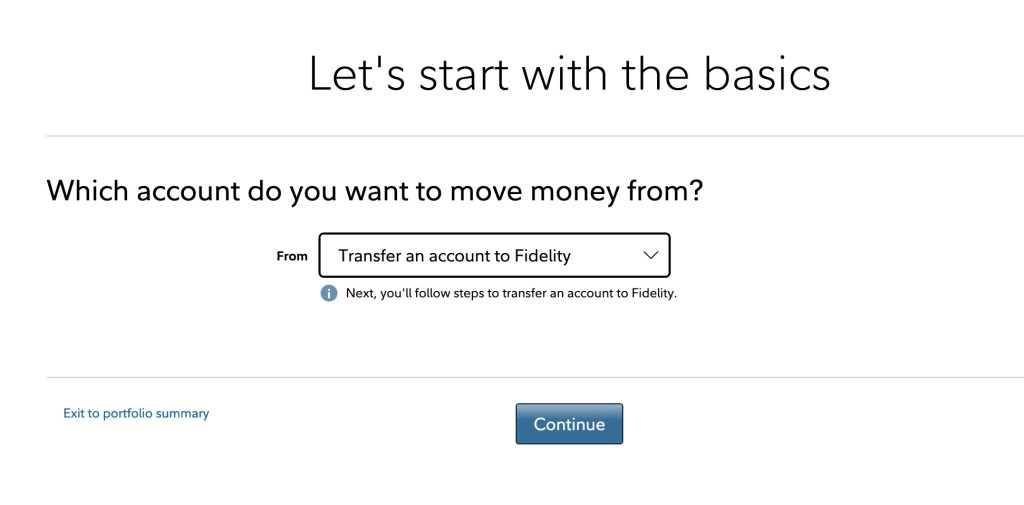
1. Once you login to your HSA account at Fidelity, click on “Transfer” along the top menu bar.

2. In the drop down, choose “Transfer an account to Fidelity” and click Continue.
3. Under “Investment of retirement accounts” click “Start a Transfer“

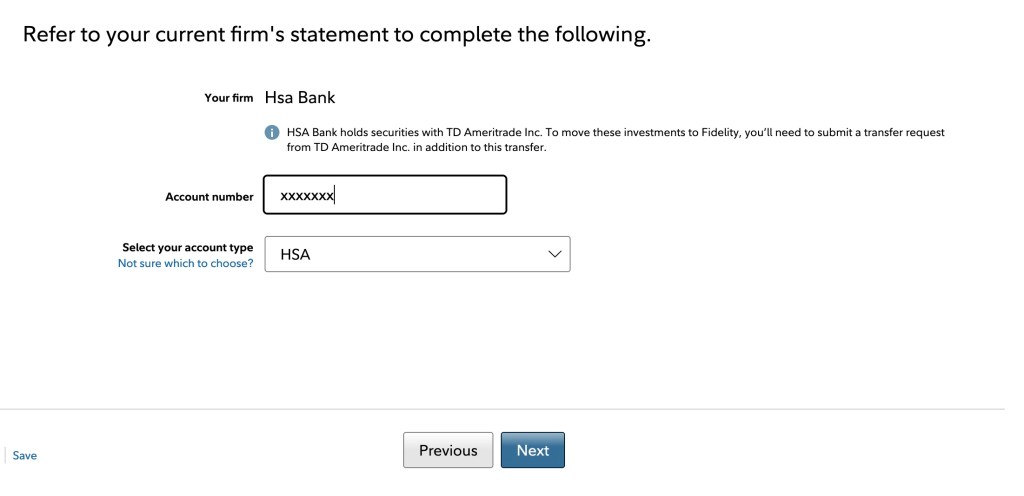
4. In the search box start typing the name of your HSA provider and it should pop up, so then choose it. (In this case, I chose HSA Bank.)

5. Then type in your account number (sometimes your Social Security number) and select “HSA” as your account type, then click Next.
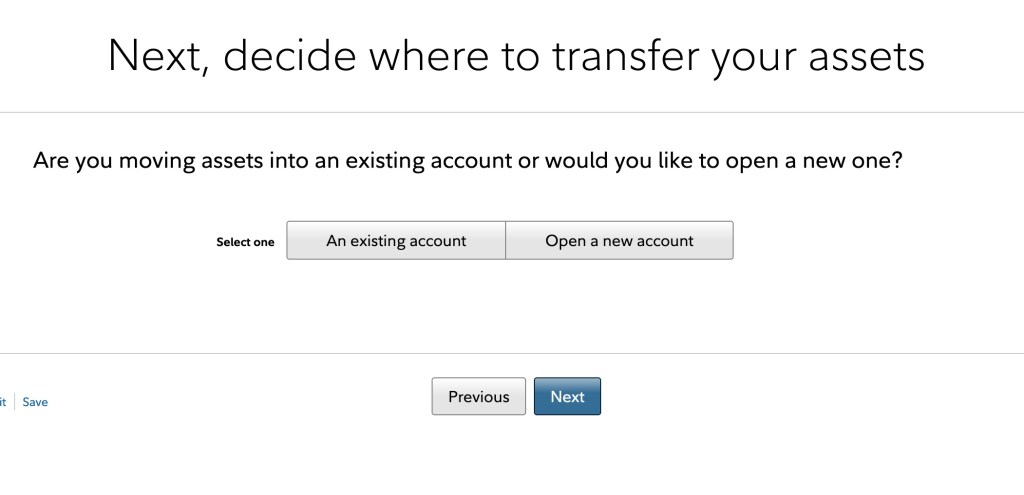
6. Assuming you have already opened your HSA account at Fidelity, choose “An existing account“, then click Next. (If you haven’t, then go ahead and open a new account.)
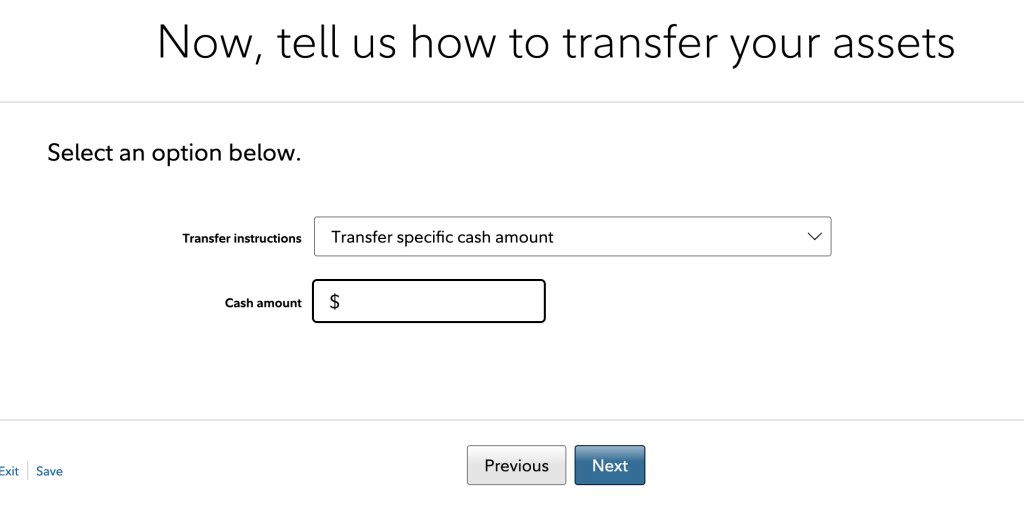
7. Choose “Transfer specific cash amount” and then enter the amount in the Cash Amount box. Be sure to put an amount slightly less than the balance in your existing HSA as you don’t want to accidentally close your existing HSA (assuming you or your employer are still contributing to it via your paycheck).
8. Upload a statement (pdf, image) from your existing HSA to facilitate a faster transfer. (For HSA bank, the only place we could find anything resembling a statement was under “tax documents”.)
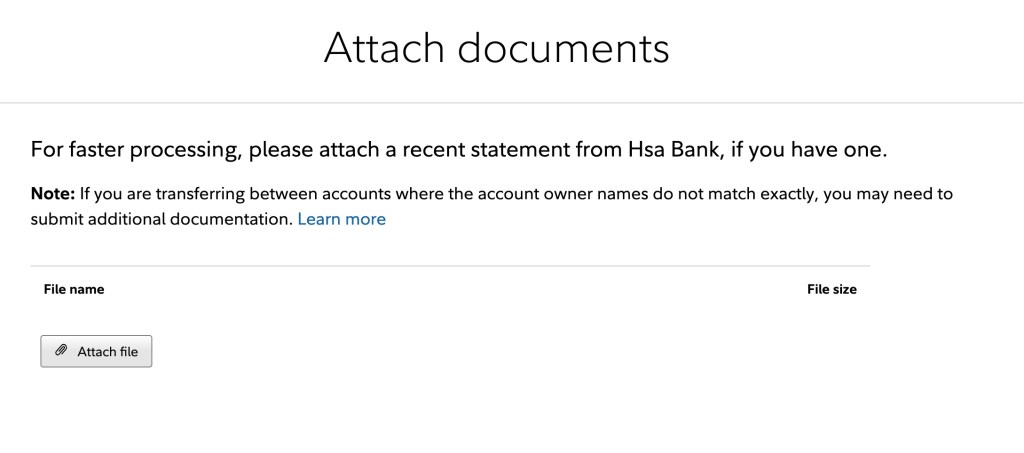
9. After that just follow the prompts to review and then confirm the transfer. From there, Fidelity will take care of the rest. Depending on your existing HSA provider, the transfer could take several weeks. That’s frustrating, but just be patient.
Once the money does arrive, make sure you invest it. By default, it will go into the Money Market account, which isn’t bad considering the very low interest you were likely earning at your regular provider. But, if you are implementing the “HSA as stealth retirement account”, you are going to want to invest in something with higher return potential like a Total Stock Market Index Fund (two good choices at Fidelity are FSKAX and FZROX).
Once you’ve successfully transferred money once, future transfers will seem very easy. Again, set up a transfer cadence that makes sense for you based on any fees your existing HSA provider charges for outgoing transfers and how often you want to take the 5 minutes to initiate the transfer. And don’t forget to log back in and invest the money once it arrives.
 Fisch Financial
7 thoughts on “Why You Should (and How To) Transfer Your HSA to Fidelity”